
Targeting
The Targeting and Schedule tabs decide who sees an ad. Leave a rule empty and it is ignored. When several rules are filled in, all of them have to match.
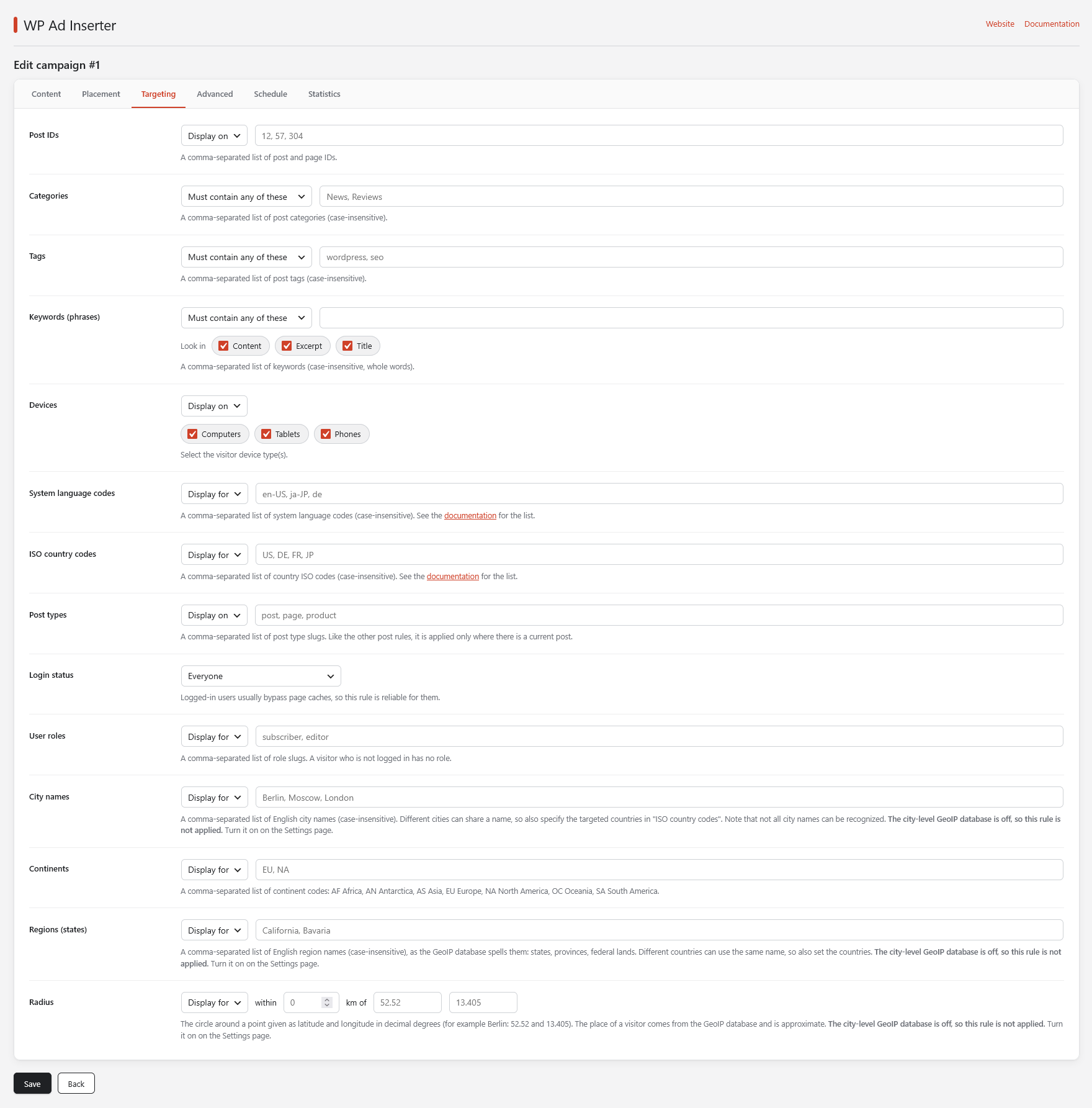
Rules about the post
These rules look at the post that is being shown, so they are applied only where there is a current post. On a page without one, for example a campaign in the footer of a 404 page, they are skipped.
Post IDs
Choose Display on or Hide on and enter a comma-separated list of post and page IDs.
Post types
Choose Display on or Hide on and enter a comma-separated list of post type slugs such as post, page, product.
Categories and Tags
Enter a comma-separated list of category or tag names (not slugs). Names are compared without regard to case, in any alphabet. The rule decides how the list is used:
| Rule | The ad is shown when the post… |
|---|---|
| Must contain any of these | belongs to at least one of the listed categories (has at least one of the tags). |
| Must contain none of these | belongs to none of them. |
| Must contain all of these | belongs to all of them. |
Keywords (phrases)
The same three rules, applied to keywords and key phrases found in the post. Keywords are matched without regard to case and only as whole words: the keyword floccin does not match “floccinaucinihilipilification”. Under Look in choose where to search: Content, Excerpt and Title.
Rules about the visitor
These rules are applied everywhere, with or without a current post.
Login status and User roles
Login status limits the campaign to everyone, to logged-in users only or to visitors who are not logged in. User roles takes a comma-separated list of role slugs such as subscriber, editor with Display for or Hide for. A visitor who is not logged in has no role. Logged-in users usually bypass page caches, so these two rules are reliable for them.
Devices
Choose Display on or Hide on and tick Computers, Tablets and Phones. The device is recognized from the browser’s user agent string. Computers are everything that is not a mobile device.
System language codes
The languages a visitor’s browser reports can say more than the IP address: an Italian tourist in China still has Italian among the browser languages. Enter a comma-separated list of codes such as en-US, ja-JP, de and choose Display for or Hide for.
- The ad matches if any of the visitor’s browser languages equals any code in your list. Codes are compared exactly:
endoes not matchen-US, so list the codes you want. Browsers usually send both, for exampleen-US,en. - Codes are case-insensitive.
- If the browser sends no language at all, the ad is not shown.
See the list of language codes.
ISO country codes
This is the rule most ad campaigns need: almost every offer is meant for specific countries. Enter a comma-separated list of two-letter country codes such as US, DE, FR and choose Display for or Hide for. The country is found from the visitor’s IP address. See GeoIP and visitor IP.
- Codes are case-insensitive.
- If the country cannot be found, Display for hides the ad and Hide for shows it.
See the list of country codes.
City names
Choose Display for or Hide for and enter English city names such as Berlin, Moscow, London. A name also matches the city part of the visitor’s time zone, for example Berlin matches Europe/Berlin, and a district in brackets in the database (Berlin (Mitte)) is ignored. Different cities can share a name, so also set the countries. Not every city can be recognized.
Continents
Choose Display for or Hide for and enter continent codes: AF Africa, AN Antarctica, AS Asia, EU Europe, NA North America, OC Oceania, SA South America. Works with the country database.
Regions (states)
A comma-separated list of English region names such as California, Bavaria, spelled as the GeoIP database spells them (states, provinces, federal lands). Case is ignored. Different countries can use the same name, so also set the countries. Needs the city-level database.
Radius
Choose Display for or Hide for, enter a distance in kilometres and the latitude and longitude of the centre in decimal degrees, for example Berlin 52.52 and 13.405. The place of a visitor comes from the city database and is approximate, so use a generous radius. Needs the city-level database.
Advanced rules
The Advanced tab has rules about the author and the age of the post and about the request of the visitor. As everywhere, an empty field is ignored and all filled-in rules have to match.
Rules about the post
Like the other post rules, these are applied only where there is a current post.
- Author
- Choose Display on or Hide on and enter a comma-separated list of author user names or IDs.
- Post age (days)
- Show the ad only on posts published at least From and at most to days ago. A field that is empty or 0 means no limit.
- Minimum words
- Show the ad only in posts with at least this many words. Words of any alphabet are counted, but shortcodes and HTML tags are not.
Rules about the request
- Page address
- A comma-separated list of text fragments. The rule matches when the address of the page (the path and the query string) contains any of them, for example
/blog/, /category/news. Case is ignored. - URL parameters
- A comma-separated list of
name(the parameter is present) orname=valueentries, for exampleutm_source=newsletter, ref. - Referrer
- A comma-separated list of text fragments of the address the visitor came from, for example
google, facebook.com. Usedirectfor visitors who arrive without a referrer. Choose Display for or Hide for. - Cookies
- A comma-separated list of
name(the visitor has the cookie) orname=valueentries. - Browser and system
- A comma-separated list of text fragments of the browser’s user agent string: the browser, the device or the operating system, for example
Firefox, iPhone, Windows.
On a site with a full-page cache the page address and the URL parameters belong to the cached page, so they work. The referrer, the cookies and the browser differ for every visitor: use browser mode for such campaigns. In browser mode the page address and the referrer are those of the page, not of the background request.
Schedule
The Schedule tab limits the ad to certain days and hours in the visitor’s own time zone.
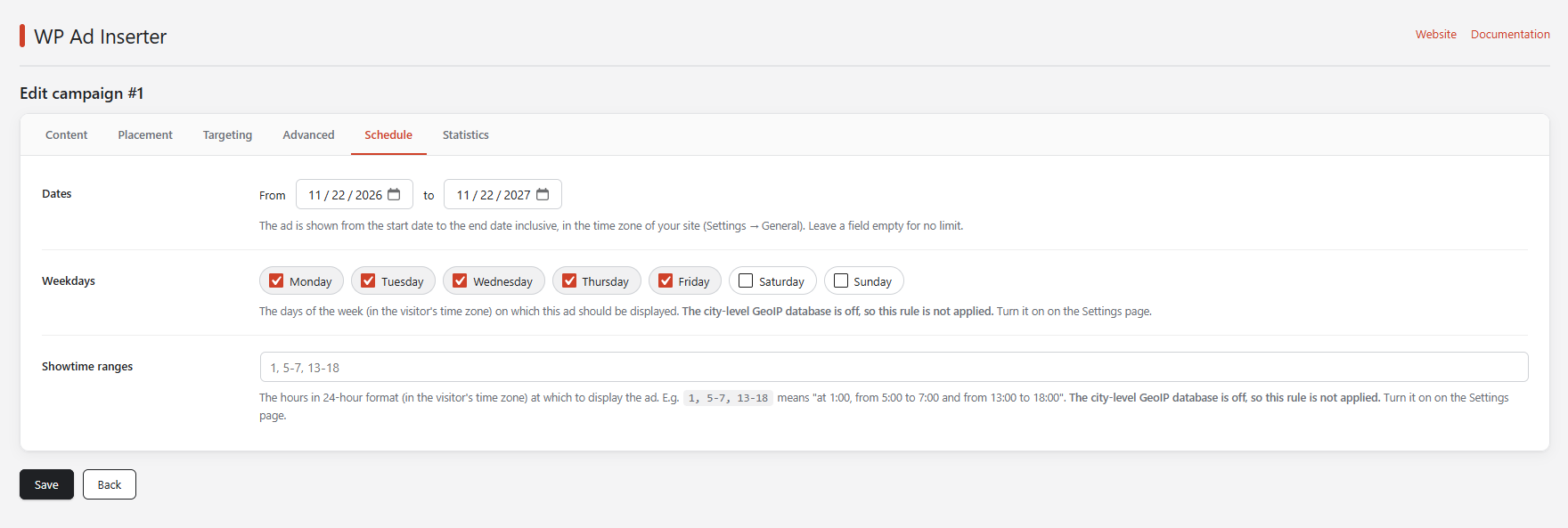
- Dates
- The first and the last day on which the ad is shown, both included. They are checked in the time zone of your site (Settings → General), not the visitor’s. Leave a field empty for no limit. After the end date the ad stops, and its Ad head code stops too.
- Weekdays
- Switch on the days of the week on which the ad is shown.
- Showtime ranges
- Hours in 24-hour format.
1, 5-7, 13-18means “at 1:00, from 5:00 to 7:00 and from 13:00 to 18:00”. A range includes its last hour.
City names, weekdays and showtime ranges need the city-level GeoIP database, which is off by default. While it is off the plugin does not apply these rules, and the campaign editor says so. Turn it on on the Settings page. If the visitor’s time zone is unknown, the weekday and hour rules are ignored and the ad is shown.